
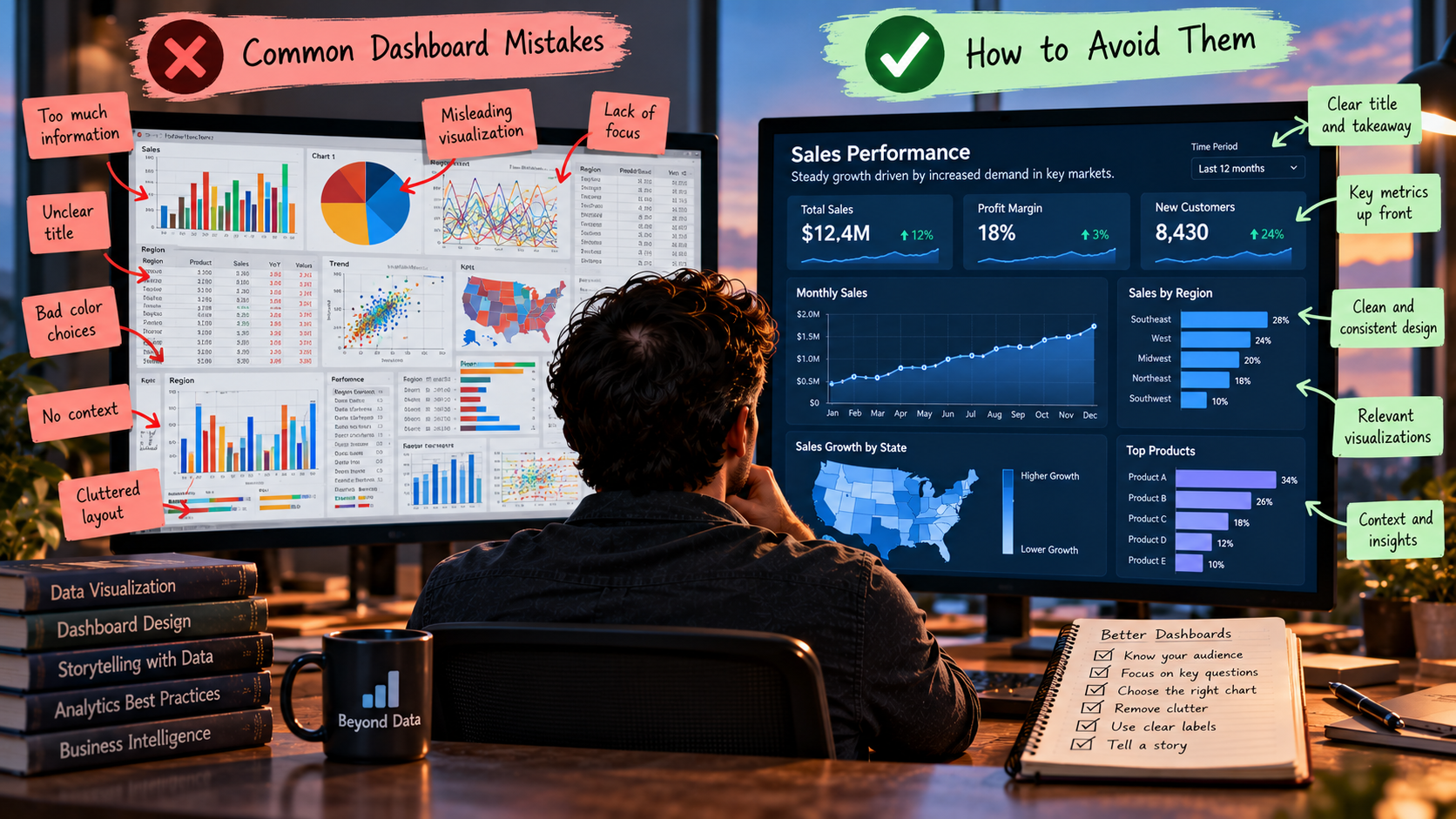
Top Dashboard Design Mistakes and How to Avoid Them
Most dashboards are dead on arrival. While the causes depend on multiple factors, these mistakes don't help the cause.
Growing up, the only dashboard I knew about was in my dad’s car. Today, when someone asks me if I looked at the dashboard, I follow up with the same question: Which one?
They are everywhere. Even my email platform has a dashboard with summaries of my unread messages, items in my calendar, neglected tasks, and the list goes on and on.
But most dashboards is an illusion of control. For a business, a leader tends to think they are actively monitoring the organization’s health at a glance. However, it is not always capturing the information the viewer seeks.
With the proliferation of these platforms, the focus has shifted from displaying a bunch of numbers to let’s make this more useful as users have a low analytic literacy (Alhamadi et al., 2022).
Bach et al. (2022) analyzed 144 dashboards along with workshops. Their found that an effective dashboard is a fine balance between the clutter and simplicity. Focusing on the answers is the key to a successful design.
After years building dashboards, some of which got single digit hits, here is what I’ve learned and the top mistakes I did when building them.
1. Ignoring Audience
This is often overlooked. But the audience is what sets the pace and the how it will be designed. It dictates how the data is presented. The designer or developer should consider the audience’s level of literacy. Graph interpretation also hinges on prior knowledge. Even when reading a simple line or bar graph, the most common types of visualization (Shah & Freedman, 2011).
When the visualization is being presented to the general public, designing a dashboard without considering the greater audience is quick way to fail. Communicating findings to audiences with diverse background comes with a myriad of challenges. Peck et al (2018) found that educational background, political affiliation, and personal experience shape the attitudes toward data visualization. They concluded that people reading visualizations were looking for components they could personally relate to.
Additionally, Alhamadi et al. (2022) explains that one of the greatest pitfalls of dashboard designs is the fundamental mismatch between users literacy and dashboard requirements. Designers often assume users possess a higher level of data or subject understanding. This creates complex visual element that end-users cannot interpret.
When creating visualization, the first item on the agenda should be your audience. Stragegic users tend to look for high levels trends, health indicators, and macro metrics. Similarly, tactical and operational are looking for department data to allocate resources. Analytical users require more granular data.
2. Cluttering the Screen
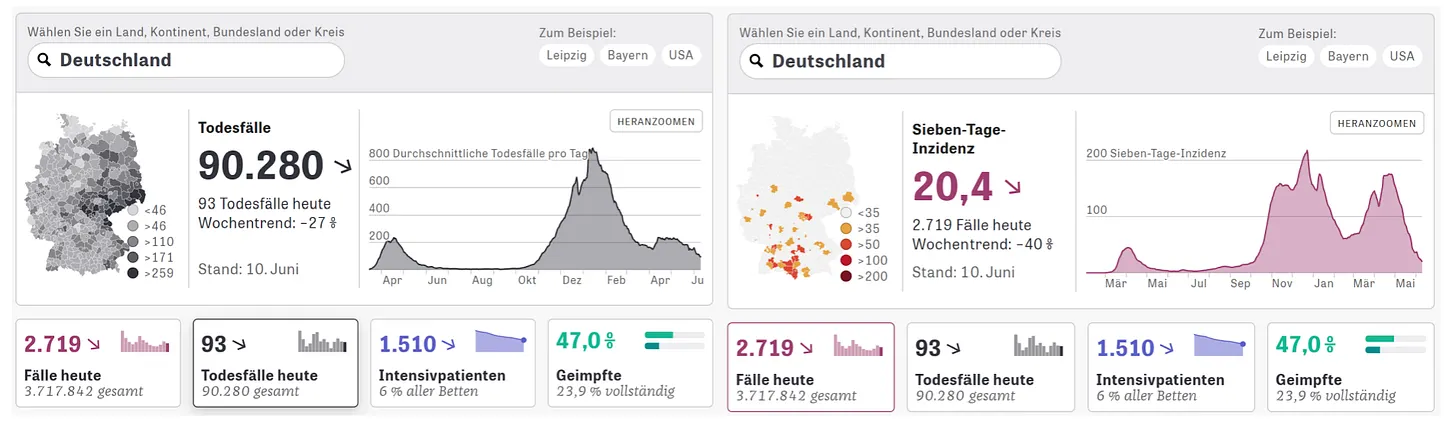
When describing a dashboard layout, each individual component is called a widget. Because of the amount of data that needs to be presented, cluttering the screen often becomes a design mistake.
The information overload was the most common error in Bach et al. (2022) study. In fact, cluttering the screen was a consistent issue found across multiple research.
A cluttered screen makes it difficult for the user to understand and drastically slows visual search. Users have said the best dashboards fit the screen without having to scroll.
The biggest problem with that unique solution is that building a concise dashboard is not always an option for the amount of data that needs to be communicated. Bach et al. (2022) suggested the best solution to this problem is to assert what is essential to be in the main dashboard.
Then, create secondary, drilldown, dashboards with the additional information. This was echoed by Ajani et al. (2022). They explained that decluttering the dashsboard pays off leading to higher ratings of professionalism and clarity.
3. Overusing Colors
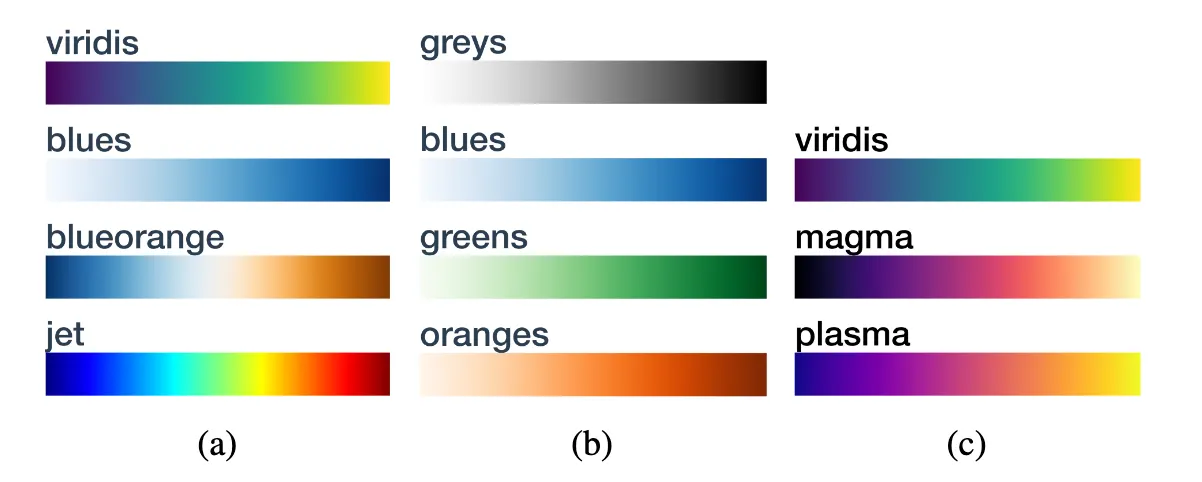
Note. Traditional colormaps for visualization (Liu & Heer, 2018)
Colors make visualization more appealing, there is no question about that. But when trying to convey a message, the colors selected could be a hindrance. It affects the way the visualization is interpreted. Thus, it must be approached with care as multiple parameters play a role on the selection of right colors.
When the dashboard is too colorful, it affects accuracy. Liu and Heer (2018) found that rainbow colormaps hinder accurate reading of the visualized data. The chart below is a perfect example. There is no clear message. Your eyes move from side to side attempting to indentify the message.
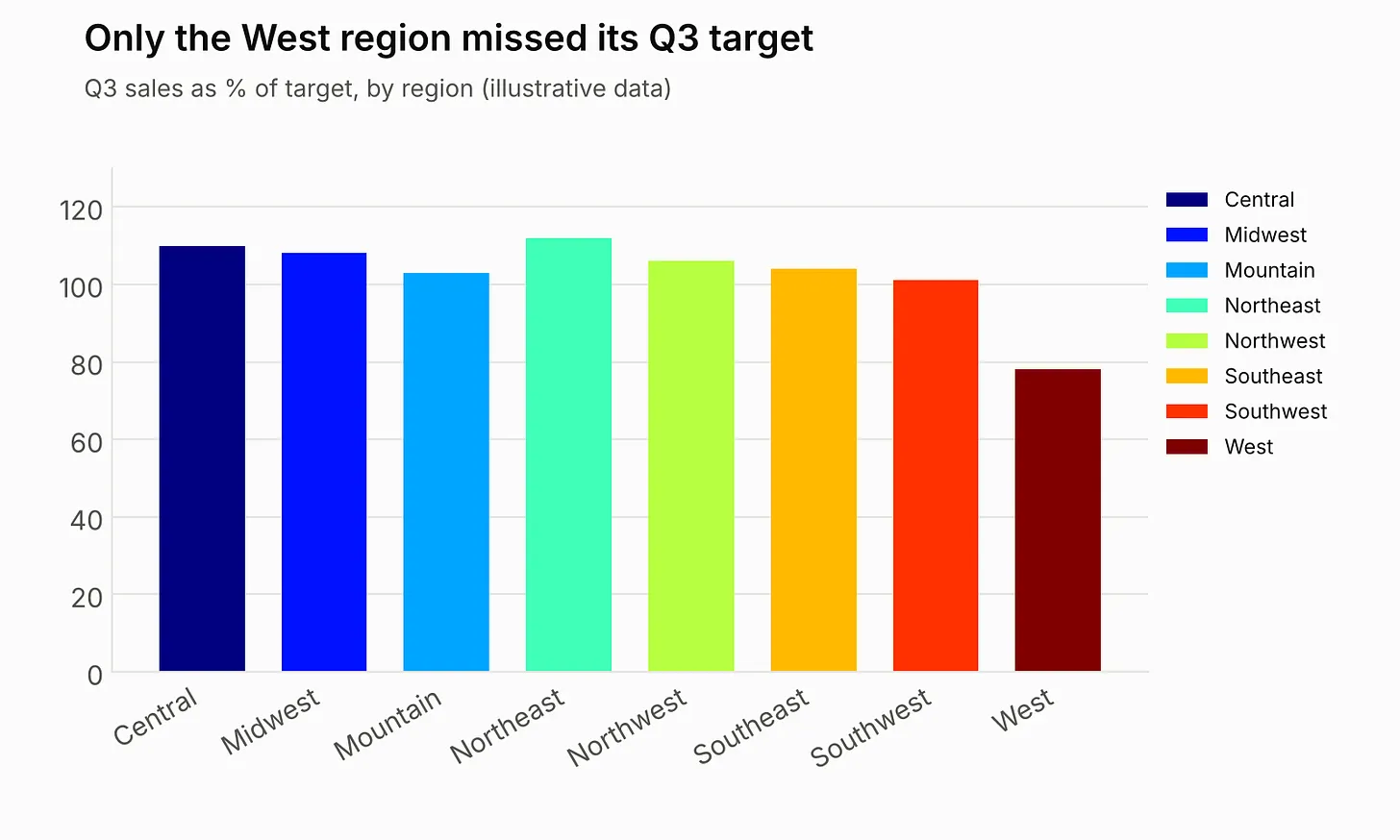
In reality, there are only a handful of colors that can be quickly distinguished reliably in a display; beyond that, the colors stop working as quick visual signals (Healey, 1996). Selecting the right colors will make you charts and dashboard more visually appealing.
Most importantly, for color encoding to be effective, certain values and differences in the data must be preserved. The right colors must be selected according to the message you are trying to convey. For instance, red usually has a negative connotation and should be reserved for messages of that nature; like revenue drop in the last quarter.
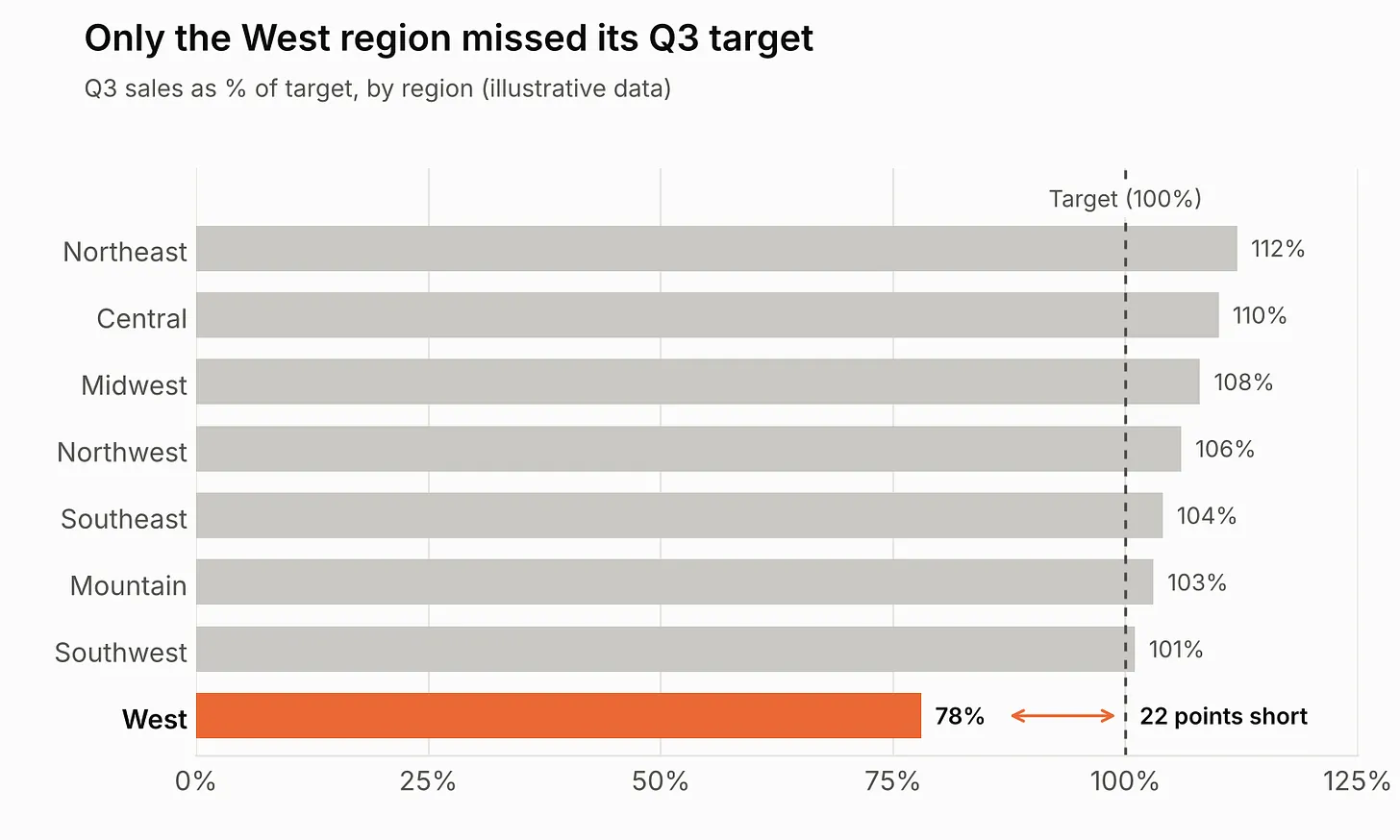
On the chart above, the message is clearly indicated. Your eyes move directly to the red. The color suggests that something is wrong or missing. In this case, it was the sales target.
4. Selecting the Wrong Charts
Picking the wrong chart is like trying to wear a pair of shoes that doesn’t fit. Either too big or too small, both are uncomfortable alike.
Charts add a little more to the fold. People often judge position and scale differently. What it seems to be closer for one person, it might be perceived as further apart for another.
In their work, Cleveland and McGill (1984), today considered one of the core foundational fillar of modern data visualization, also found that people tend to judge position along a common scale most accurately. Length, angle, and color saturation are progressively worse.
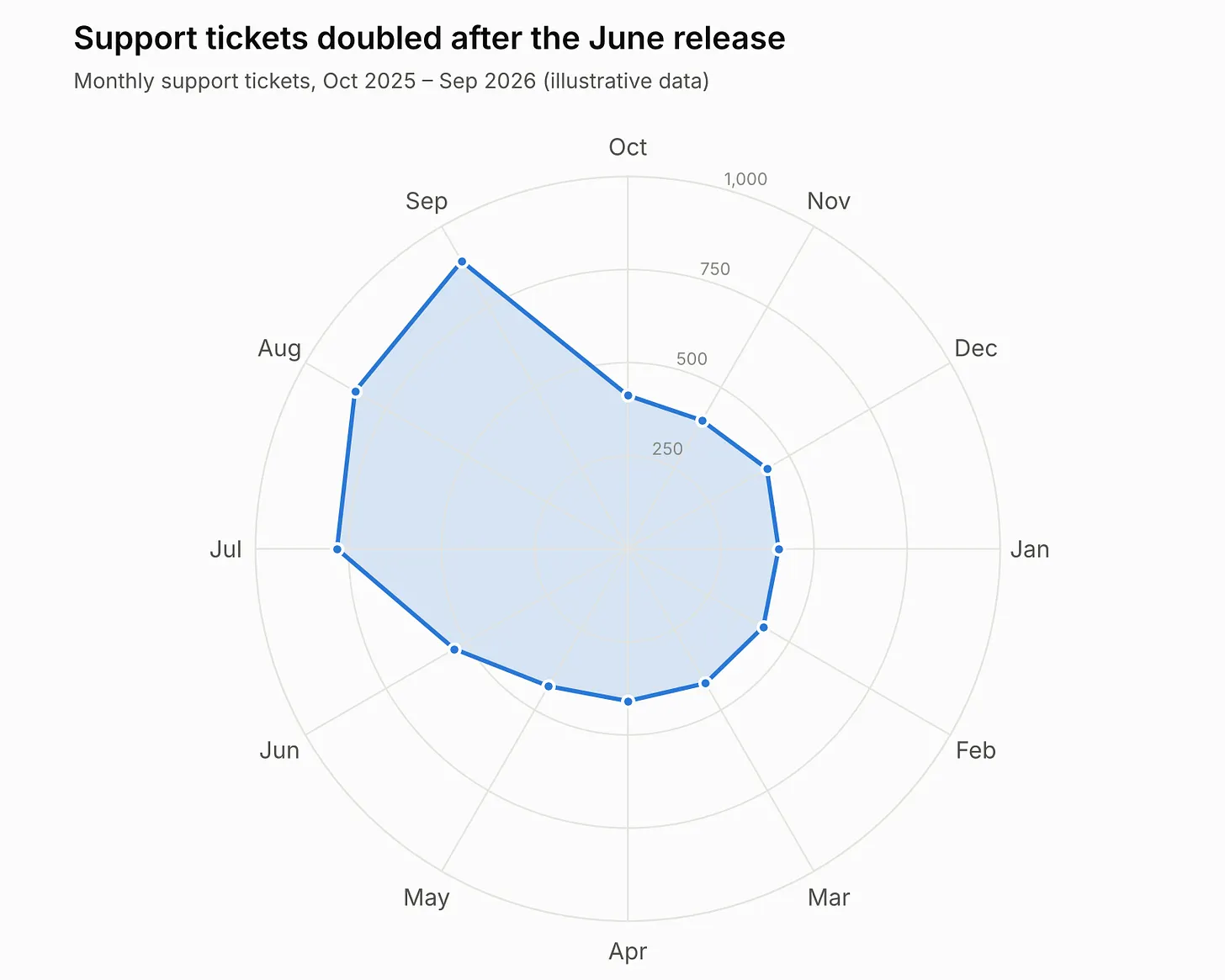
Finding the right chart is not a personal selection by any means. It is highly dependent on the task, and the story you are trying to tell. The image above is a radar chart for support tickets after June’s release. While the chart is clear, and it shows the data accurately, it is hard to read and understand what is happening. It seems like there is too much going on.
The radar chart has its functions and it can work well to show other data properly for other applications.
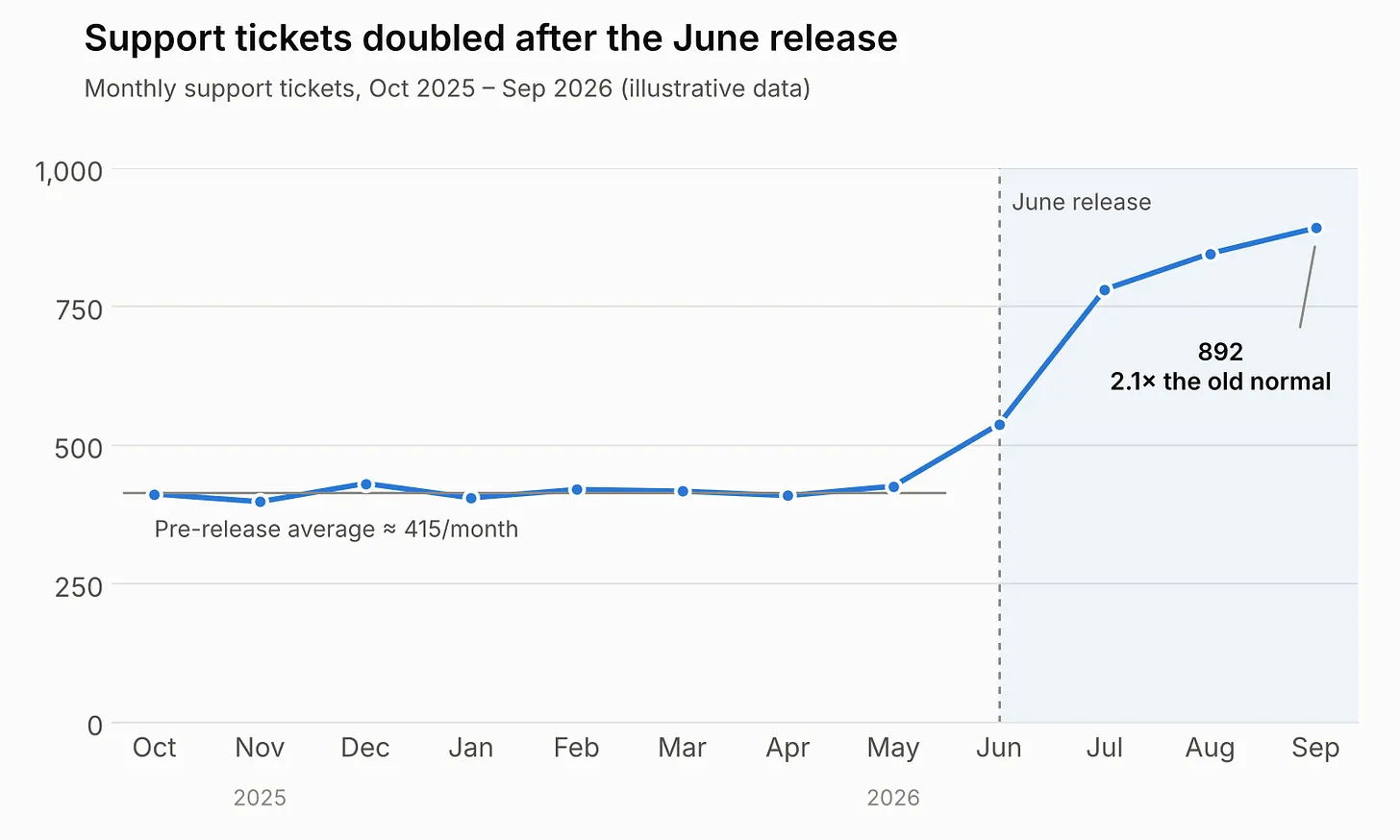
With the same data we produced a line chart and added a few captions to better explain waht is happening. The image shows a much better output and easier to follow.
Understanding the effectiveness of visualization om different tasks and data context is fundamental for scaling a project (Saket et al., 2019).
5. Missing Context
Context is persuasive. When delivered correctly, it is a powerful tool.
One critical element in the context are titles. People often recall visualizations with titles rather than the visualization themselves (Kong et al., 2018). Multiple research have come to the same conclusion, the biggest element in missing context are the titles.
Ajani et at. (2022) found that adding focus (a headline, highlighting, and annotation) led to higher ratings on aesthetics and clarity. Headlines is also a topic I covered in this post.
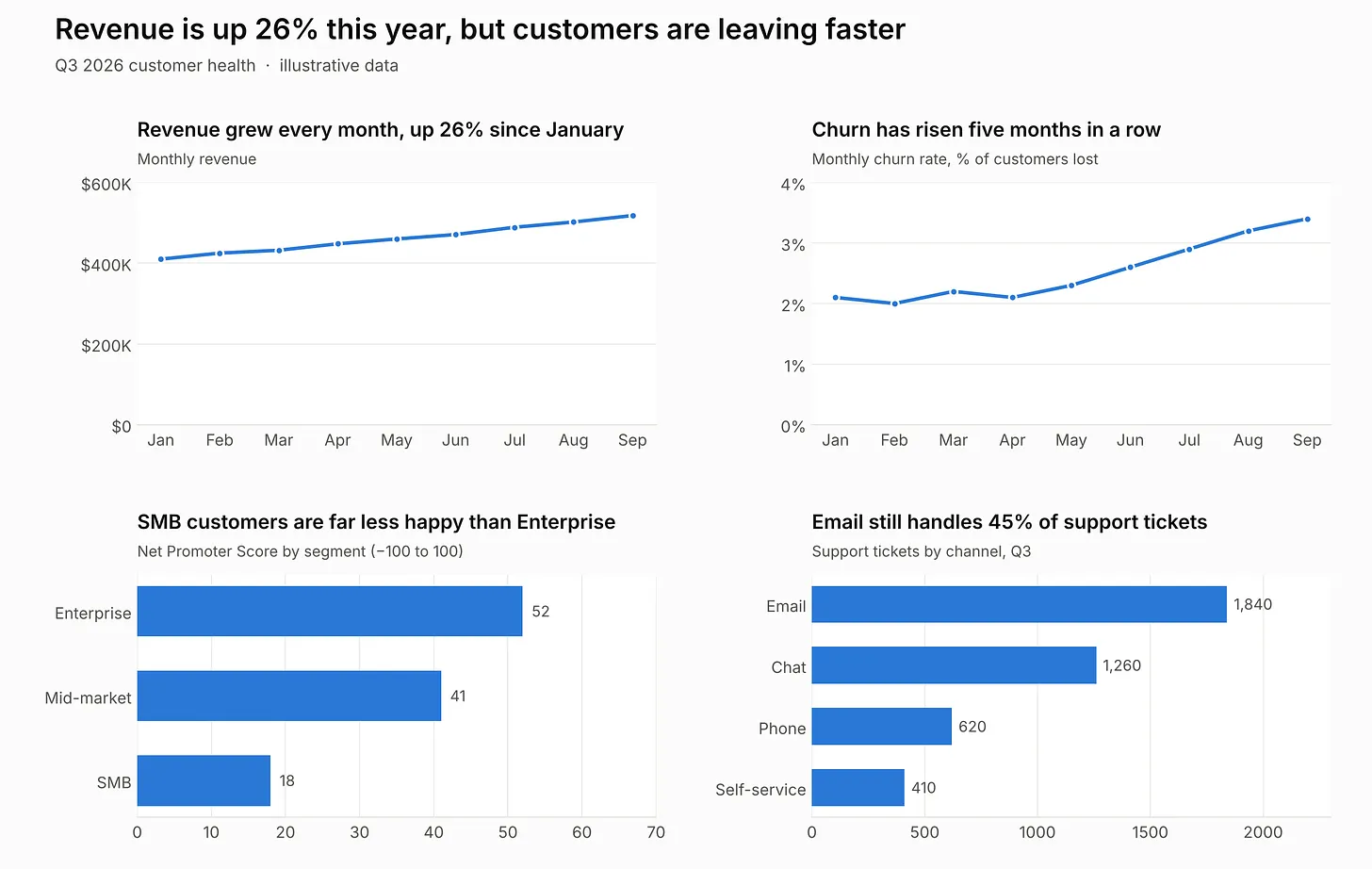
Consider the image above. It shows four different graphs with titles and other captions. It provides you with some context to the numbers that are you looking and analyzing. Notice that your eyes tend to go to the titles and subtitles first, then to the figures.
Now, consider the image below.
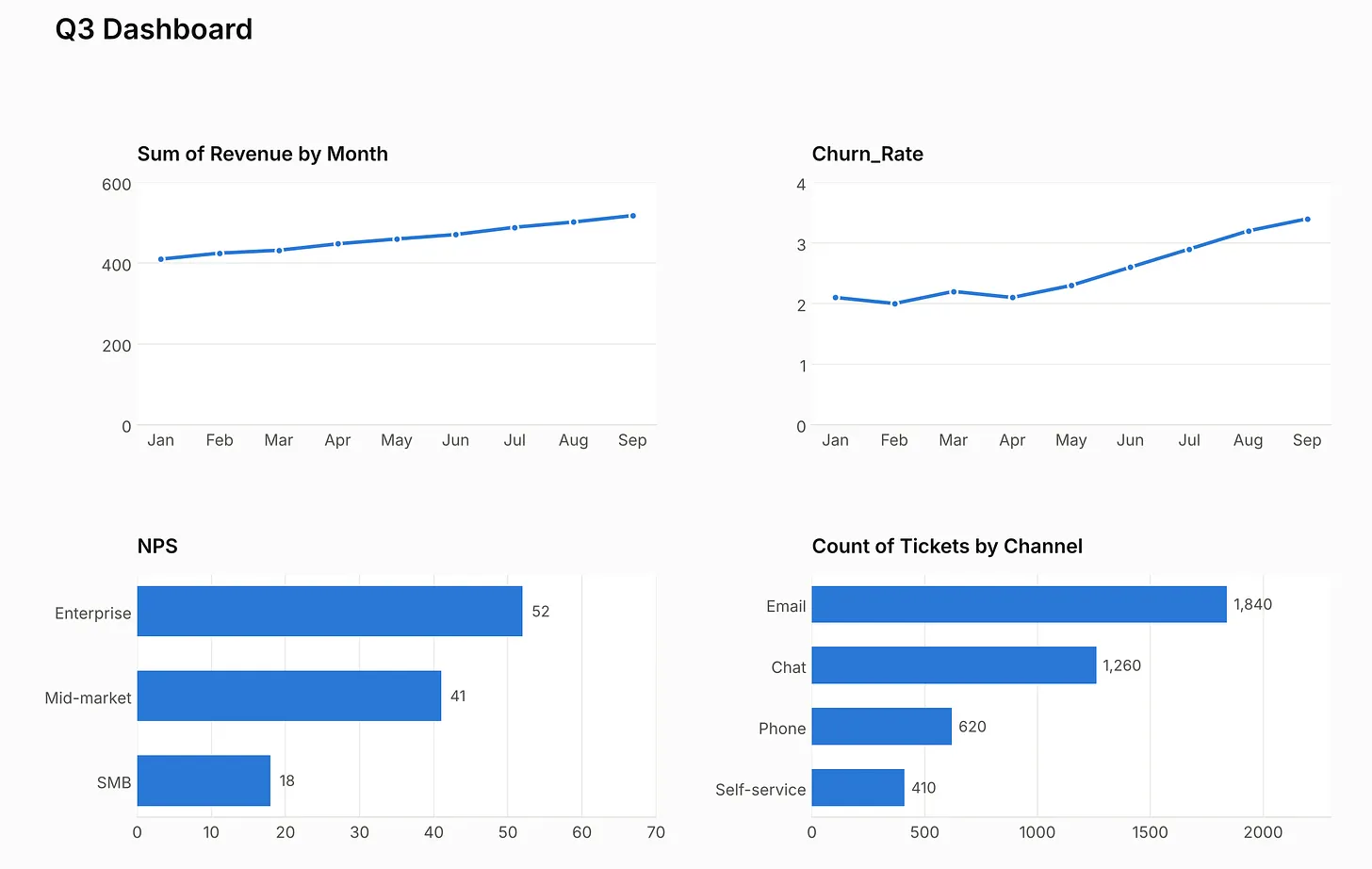
It provides the same charts and data that you see in the previous one. However, without the captions to give you more context, the reading and understanding of the data becomes more complex. You have to stop and really look at the numbers to understand what it is showing.
Without the titles, viewer read in causation and tend to infer causual relationships from correlational charts. Clarifying context will prevent such causation (Xiong et at., 2020).
6. Poor or Unorganized Data
We are entering the cliche, yet very real, zone of garbage in, garbage out. Unless the data is fully comprehended and well organized by the analyst creating the visualizations, it will be garbage out.
Data is rarely ready to use and most analysts spend 85% to 95% of the time finding, cleaning, and wrangling data. These are critical foundations for any type of project and by far the most time consuming. A visualization is only as good as the data it is showing.
The most critical issue that I’ve encountered is missing data. That is a problem that happens in most statistical analysis. It could be due to lack of collection, corrupt pipelines, to name some of the many problems.
In their study, Alsufyani et al. (2024), evaluted different imput methods and found that, in many cases, missing data influences the analyst perception of the data quality. It certainly does to me. This is specially true when there is a significant amount of missing data in the variables being analyzed.
Finally, data organization is perceptual. Palmer (1992) established “common regions:” items enclosed in a shared boundary are preceived as a group. This was echoed by Bach et al. (2023) cateloging the layout and structure patterns.
7. Overusing Text and Labels
A good visualization requires a certain amount of text, labels, and captions. But its overuse can lead to confusion. Mayer et al. (2001) cleverly suggested that more words could amount to less understanding.
Sometimes is very difficult when you have a large dataset and to create a compeling presentation, the space available is not sufficient. Even in such cases, decluttering, and removing non-critical texts becomes an art.
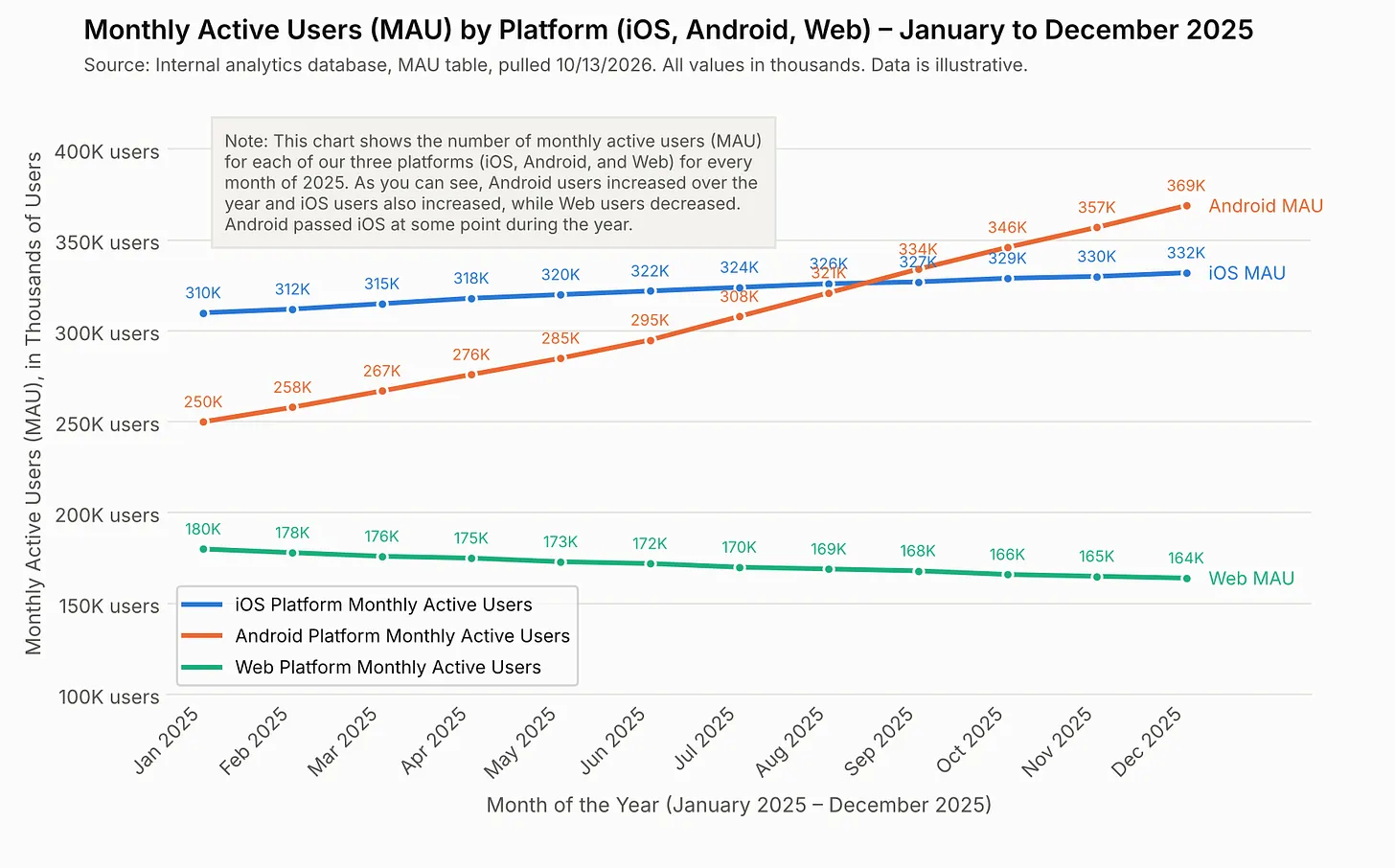
Consider the image below. While you are still able to see all of the numbers and analyze the graph, the large amount of text takes away from the message.
Likewise, when you look at the image below, virtually the same graph as above, with less text, becomes more appealing to the eyes, and easier to digest.
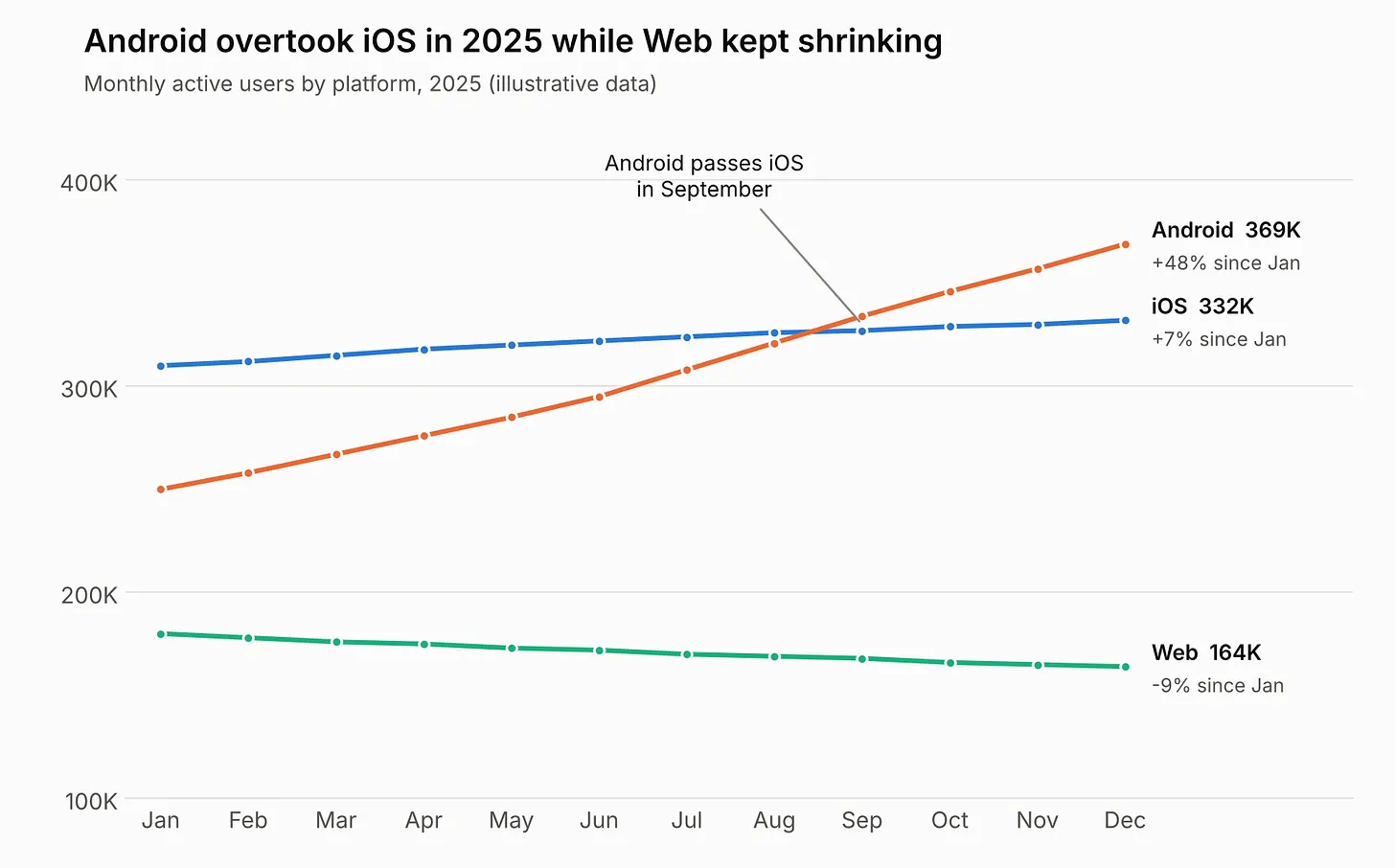
Legends cost viewers bandwidth as they tend to go back and forth between key and data. Thus, direct label is often favored over legends (Shah & Hoeffner, 2002).
Conclusion
I like to approach my dashboards like seasoning a hunk of meat. When you put just enough salt on it, it is delicious. But the overuse of any ingredient could make even a premium cut into a unappealing dinner.
Likewise, a dashboard requires all these different elements to make it useful. However, one item cannot overtake the other. When planning and building a dashboard, try to harmonize all of these different items into your graphs.
References:
Ajani, K., Lee, E., Xiong, C., Knaflic, C. N., Kemper, W., & Franconeri, S. (2022). Declutter and Focus: Empirically Evaluating Design Guidelines for Effective Data Communication. IEEE Transactions on Visualization and Computer Graphics, 28(10), 3351–3364. https://doi.org/10.1109/TVCG.2021.3068337
Alhamadi, M., Alghamdi, O., Clinch, S., & Vigo, M. (2022). Data Quality, Mismatched Expectations, and Moving Requirements: The Challenges of User-Centred Dashboard Design. https://doi.org/10.48550/arXiv.2209.06363
Alsufyani, S., Forshaw, M., & Fernstad, S. J. (2024). Visualization of missing data: A state-of-the-art survey(arXiv:2410.03712). arXiv. https://doi.org/10.48550/arXiv.2410.03712
Bach, B., Freeman, E., Abdul-Rahman, A., Turkay, C., Khan, S., Fan, Y., & Chen, M. (2022). Dashboard Design Patterns. IEEE Transactions on Visualization and Computer Graphics, 1–11. https://doi.org/10.1109/TVCG.2022.3209448
Cleveland, W. S., & McGill, R. (1984). Graphical Perception: Theory, Experimentation, and Application to the Development of Graphical Methods. Journal of the American Statistical Association, 79(387), 531–554. https://doi.org/10.2307/2288400
Healey, C. G. (1996). Choosing effective colours for data visualization. Proceedings of Seventh Annual IEEE Visualization ’96, 263-270,. https://doi.org/10.1109/VISUAL.1996.568118
Kong, H.-K., Liu, Z., & Karahalios, K. (2018). Frames and Slants in Titles of Visualizations on Controversial Topics. Proceedings of the 2018 CHI Conference on Human Factors in Computing Systems, CHI ’18, 1–12. https://doi.org/10.1145/3173574.3174012
Liu, Y., & Heer, J. (2018). Somewhere Over the Rainbow: An Empirical Assessment of Quantitative Colormaps. Proceedings of the 2018 CHI Conference on Human Factors in Computing Systems, CHI ’18, 1–12. https://doi.org/10.1145/3173574.3174172
Mayer, R. E., Heiser, J., & Lonn, S. (2001). Cognitive constraints on multimedia learning: When presenting more material results in less understanding. Journal of Educational Psychology, 93(1), 187–198. https://doi.org/10.1037/0022-0663.93.1.187
Palmer, S. E. (1992). Common region: A new principle of perceptual grouping. Cognitive Psychology, 24(3), 436–447. https://doi.org/10.1016/0010-0285(92)90014-S
Peck, E., Ayuso, S., & El-Etr, O. (2018, September 9). Data is Personal: Attitudes and Perceptions of Data Visualization in Rural Pennsylvania. Ar5iv. https://ar5iv.labs.arxiv.org/html/1901.01920
Saket, B., Endert, A., & Demiralp, Ç. (2019). Task-Based Effectiveness of Basic Visualizations. IEEE Transactions on Visualization and Computer Graphics, 25(7), 2505–2512. https://doi.org/10.1109/TVCG.2018.2829750
Shah, P., & Freedman, E. G. (2011). Bar and Line Graph Comprehension: An Interaction of Top-Down and Bottom-Up Processes. Topics in Cognitive Science, 3(3), 560–578. https://doi.org/10.1111/j.1756-8765.2009.01066.x
Shah, P., & Hoeffner, J. (2002). Review of Graph Comprehension Research: Implications for Instruction. Educational Psychology Review, 14(1), 47–69. https://doi.org/10.1023/A:1013180410169
Xiong, C., Shapiro, J., Hullman, J., & Franconeri, S. (2020). Illusion of Causality in Visualized Data. IEEE Transactions on Visualization and Computer Graphics, 26(1), 853–862. https://doi.org/10.1109/TVCG.2019.2934399
No comments yet. Be the first.