
FIELD NOTE
Creating Relevant Synthetic Data
One of the greatest obstacles maintaining a blog about data is the data itself. Simply sharing information as a blog entry can come across as boring. Or even irrelevant.
Often, I struggle with how much information I can, and should share. I come across interesting things, and learn from mistakes. Sharing what I’ve learned without talking about customers or use their data in any way, shape, or form is challenging.
Much like many of my peers, I’ve turned to Kaggle to find datasets to work on. However, it is rare to find a robust dataset to where I can apply the same methodology in the real world with results worth sharing.
Recently, I was working on a project that required forecasting based on sales. The nuances of the project amused me. There was so much that I could share about the challenges and outcomes. That’s when I decided to work up a notebook and create my own data.
Products
To similate the problem I worked on, I needed products, orders, returns, and so on. My using a Kaggle dataset baseline (e-commerce dataset with 30k products). I started the importing process.
import pandas as pd
import kagglehub

path = kagglehub.dataset_download("mukuldeshantri/ecommerce-fashion-dataset")
path = Path(path)

csv_files = list(path.glob("*.csv"))
products_raw = pd.read_csv(csv_files[0], index_col=0)
products_raw.head()
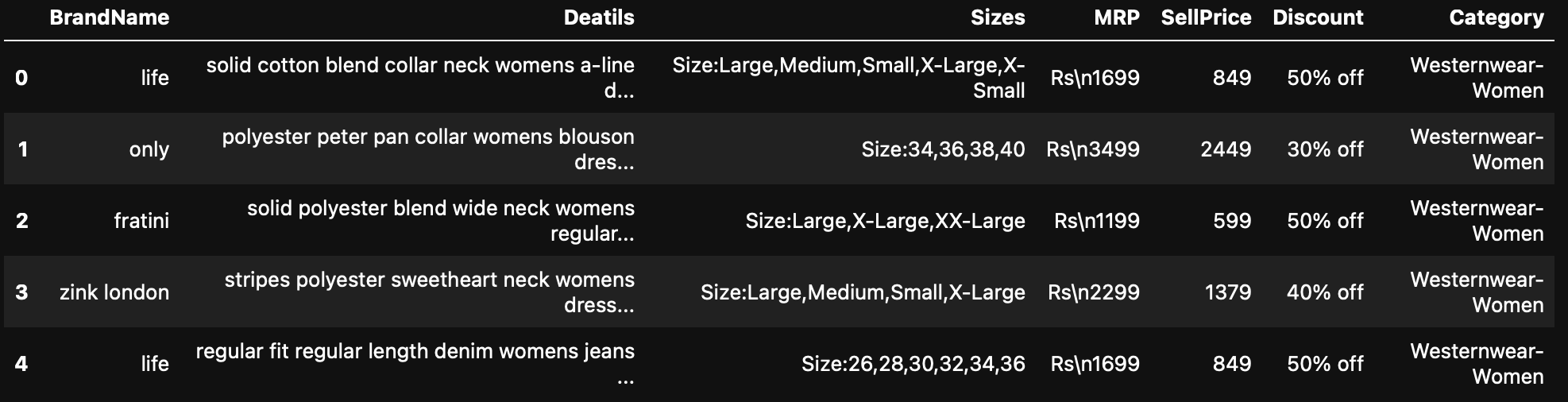
Right off the bat, I can see that this data is going to need some work to be usable. The manufacturer suggested price was in Indian Rupees, the discount was string, and sizes were all nested into one cell.
EDA
First thing I do in my EDA is made the necessary adjustments to the variables. It makes sense here because of the application of the dataset. In a lot of cases, changing the name of the variables can be tricky and not suggested. If other scripts are using the same dataset, changing the name is not a good idea.
In my case, however, I’m creating the dataset and want the variables to be named a certain way.
Standardizing the table headers is not required, but it makes a lot easier to work. I made them all lower case, and fixed a misspeling.
The initial EDA showed a number of issues that would have to be fixed before we can even start to using the dataset. Starting with the price format. To convert it to integers, I used regex. I dropped duplicates and items that, in the process, ended up without a price.
To be more accessible to me, I decided to transform the price to US Dollars. It was just easier for me to work with.
products = products_raw.copy()

# normalizing columns
products.columns = (
    products.columns
    .str.strip()
    .str.lower()
    .str.replace(" ", "_")
    .str.replace("-", "_")
)

products = products.rename(columns={'deatils':'details'})

products['mrp'] = (products['mrp']
                   .astype(str)
                   .str.replace(r"[^0-9.]", "", regex=True))
products['mrp'] = pd.to_numeric(
    products['mrp'],
    errors='coerce'
)

# translating prices to US dollar
products["base_price"] = (products["mrp"] * INR_TO_USD).round(2)

# adding SKU numbers
products['product_id'] = [f'PROD-{i:06d}' for i in range(1, len(products) +1)]

# Function to strip non-numeric and coerce to float
def to_number(series):
    return pd.to_numeric(
        series.astype(str).str.replace(r"[^0-9.]", "", regex=True),
        errors = "coerce",
    )

discount = pd.Series(np.nan, index=products.index, dtype=float)

# addressing issues with discount
if 'discount' in products.columns:
    real = to_number(products['discount'].str.extract(r"(\d+)", expand=False)) / 100.0
    discount = discount.fillna(real)

n_real = discount.notna().sum()

products['discount_pct'] = discount.clip(0.0, 0.95).round(4)

products['sell_price'] = (products['base_price'] * (1 - products["discount_pct"])).round(2)
That’s not all.
The data set is somewhat similar to an issue I ran in the past. One of the question the client had was not only what item is the most sold, but also identifying the most sold items by sizes.
Parsing the several variations of sizes were a little more complicated than I initially assessed. It took me a few tries, adjusting the code to encompass all of the items.
What makes it even more complicated is the mix and match. A row like Size:26,28,30,32,34,36,Medium is mostly numeric with one stray letter.
The dataset had well over ten different size conventions. Using one parser would generalize and assume that any single shape mangle the others. The use of tokens is the best approach because it tries each pattern handling each convention in its own terms.
SIZE_COL = "sizes" if "sizes" in products.columns else None
if SIZE_COL is None:
    raise KeyError(
        "No 'sizes' column found in the catalog - cannot generate SKUs."
    )

LETTER_ORDER = {s: i for i, s in enumerate(
    ["XS", "S", "M", "L", "XL", "XXL", "XXXL"]
)}
LETTER_NORMALISE = {
    "XSMALL": "XS", "SMALL": "S", "MEDIUM": "M", "LARGE": "L",
    "XLARGE": "XL", "XXLARGE": "XXL", "XXXLARGE": "XXXL",
    # Abbreviations that may already be in the raw data.
    "XS": "XS", "S": "S", "M": "M", "L": "L",
    "XL": "XL", "XXL": "XXL", "XXXL": "XXXL",
}
# Bra tokens like "34-B" or "34B": 2-3 digits then optional dash then 1-2 letters.
BRA_RE = re.compile(r"^(\d{2,3})[-_ ]?([A-Z]{1,2})$")


def parse_sizes(raw):
    """Return a list of cleaned size tokens from a raw cell value.
    Handles NaN, the 'Size:' prefix, comma- and slash-separated tokens, the
    'Error Size' / 'Free Size' garbage entries, and letter-name spellings.
    """
    if raw is None or (isinstance(raw, float) and pd.isna(raw)):
        return []
    s = str(raw).strip()
    if not s or s.lower() == "nan":
        return []
    # Drop the "Size:" prefix if present.
    if ":" in s:
        s = s.split(":", 1)[1]

    # Split on commas, then on slashes inside each comma-token (so
    # "LARGE / XL" becomes two tokens).
    raw_tokens = []
    for piece in s.split(","):
        for sub in piece.split("/"):
            sub = sub.strip()
            if sub:
                raw_tokens.append(sub)

    cleaned = []
    for t in raw_tokens:
        u = t.upper().replace(" ", "").replace("_", "")
        # Garbage / placeholder tokens.
        if u in SIZE_GARBAGE_TOKENS:
            continue
        # Bra band-cup tokens: keep as-is, uppercased and dash-normalised.
        m = BRA_RE.match(u.replace("-", ""))
        if m:
            cleaned.append(f"{m.group(1)}-{m.group(2)}")
            continue
        # Letter sizes (with or without dashes).
        u_no_dash = u.replace("-", "")
        if u_no_dash in LETTER_NORMALISE:
            cleaned.append(LETTER_NORMALISE[u_no_dash])
            continue
        # Numeric (including decimals like 7.5).
        try:
            float(u)
            cleaned.append(u)
            continue
        except ValueError:
            pass
        # Unknown - drop it.

    # Dedupe while preserving order.
    seen, out = set(), []
    for t in cleaned:
        if t not in seen:
            seen.add(t)
            out.append(t)
    return out


def classify_family(tokens):
    """Return (family, kept_tokens). If tokens mix families, drop the
    minority and keep the majority. Families: letter | numeric | bra | other.
    """
    if not tokens:
        return "other", []

    is_letter = [t in LETTER_ORDER for t in tokens]
    is_bra    = [bool(BRA_RE.match(t.replace("-", ""))) for t in tokens]
    is_numeric = []
    for t in tokens:
        try:
            float(t)
            is_numeric.append(True)
        except ValueError:
            is_numeric.append(False)

    # A bra token also satisfies BRA_RE; numeric tokens don't.
    # Pick the family with the most members.
    counts = {
        "letter":  sum(is_letter),
        "bra":     sum(is_bra),
        "numeric": max(sum(is_numeric) - sum(is_bra), 0),
    }
    family = max(counts, key=counts.get)
    if counts[family] == 0:
        return "other", tokens

    # Keep only tokens that belong to the chosen family.
    if family == "letter":
        kept = [t for t in tokens if t in LETTER_ORDER]
    elif family == "bra":
        kept = [t for t in tokens if BRA_RE.match(t.replace("-", ""))]
    elif family == "numeric":
        kept = []
        for t in tokens:
            if BRA_RE.match(t.replace("-", "")):
                continue
            try:
                float(t)
                kept.append(t)
            except ValueError:
                pass
    else:
        kept = tokens
    return family, kept


parsed = products[SIZE_COL].apply(parse_sizes)
classified = parsed.apply(classify_family)
products["size_family"] = classified.apply(lambda x: x[0])
products["size_tokens"] = classified.apply(lambda x: x[1])
products["n_sizes"]     = products["size_tokens"].apply(len)

before = len(products)
products = products[products["n_sizes"] > 0].reset_index(drop=True)
Now that I have the sizes, I need to create SKU, which is different than a product id.
def base_curve_for(tokens, family):
    """Base size-share vector for a product, summing to 1."""
    if family == "letter":
        w = np.array([LETTER_SIZE_WEIGHTS.get(t, 0.0) for t in tokens],
                     dtype=float)
    elif family == "numeric":
        nums = np.array([float(t) for t in tokens])
        center = np.median(nums)
        step = np.median(np.diff(np.sort(nums))) if len(nums) > 1 else 1.0
        step = step if step > 0 else 1.0
        z = (nums - center) / (step * NUMERIC_CURVE_SIGMA)
        w = np.exp(-0.5 * z * z)
    elif family == "bra":
        w = []
        for t in tokens:
            m = BRA_RE.match(t.replace("-", ""))
            if not m:
                w.append(0.0)
                continue
            band = int(m.group(1))
            cup  = m.group(2)
            band_w = BRA_BAND_WEIGHTS.get(band, 0.005)
            cup_w  = BRA_CUP_WEIGHTS.get(cup, 0.01)
            w.append(band_w * cup_w)
        w = np.array(w, dtype=float)
    else:
        w = np.ones(len(tokens), dtype=float)
    s = w.sum()
    return (w / s) if s > 0 else np.full(len(tokens), 1 / len(tokens))


# Build the SKU table: one row per (product, size) with a planted weight.
sku_rows = []
for row in products.itertuples(index=False):
    base = base_curve_for(row.size_tokens, row.size_family)
    # Per-product perturbation via Dirichlet. Concentration high => stay near
    # the base curve; low => more idiosyncratic.
    alpha = base * SIZE_CURVE_CONCENTRATION + 1e-6
    perturbed = rng.dirichlet(alpha)
    for size, w in zip(row.size_tokens, perturbed):
        sku_rows.append((
            f"{row.product_id}_{size}",
            row.product_id, size, row.size_family,
            round(float(w), 5),
        ))

skus = pd.DataFrame(sku_rows, columns=[
    "sku_id", "product_id", "size", "size_family", "size_weight",
])
print(f"Built {len(skus):,} SKUs from {len(products):,} products "
      f"(avg {len(skus) / len(products):.2f} sizes/product)")
In the final step, I merge the SKUs with the product. That gives me a complete dataset ready to be worked on. With these products, I can generate a number of use cases, put some of my skills to work.